Cloud GPUs: Rent vs Buy
17 September 2026
Self-managed LLM inference (without relying on API providers) requires specialist hardware: high-end GPUs.
GPU prices have been going up. At the same time, smaller LLMs have become much more powerful, making local inference accessible on less capable hardware.
This article lays out the trade-offs between renting and buying hardware (mostly GPUs) for LLM inference.
Who is this for?
Anyone who’s looking at running their own self-managed LLM inference, and deciding between buying hardware and renting it.
This generally applies to people who prioritise data privacy over cost: LLM API prices are considerably cheaper than renting or buying hardware, as API providers benefit from economies of scale in various ways. Monthly LLM subscriptions are cheaper still.
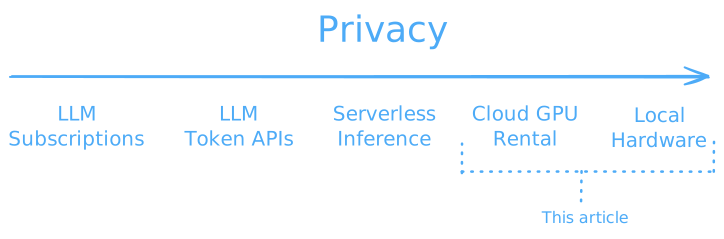
This article will cover hardware with a total cost of up to $20k, with most setups under consideration in the $4k-$12k range. That enables running open models up to around 300B parameters.
In brief
The main consideration when choosing between buying and renting hardware in late 2026 is: how valuable is guaranteed access to hardware? Availability of some GPUs at some cloud providers has been intermittent, and purchase prices have been rising steeply.
For those who expect further price rises or worsening availability and want to guarantee hardware access, buying hardware currently looks like a better deal than long-term rental reservations. Consumer-grade GPUs are not broadly available for reservations longer than 6 months, and buying a desktop with an RTX 5090 or a Mac Studio M5 Ultra would work out as cheaper than renting higher-end chips at $1.5+/h for 18 months or longer.
For those who expect prices to fall, or who can live with potential periods of unavailability, renting can make financial sense. It particularly makes sense if usage is intermittent. At 8h/day, 5d/week usage, break-even for buying takes 3-5 years, assuming that rental prices and electricity prices have minimal annual price rises in line with recent inflation. With a $0.20/kWh electricity price assumption, electricity costs for running GPUs at typical sustained power utilisation are equivalent to 3-10% of the rental price (e.g. 9 cents per hour for an RTX 5090, vs a rental price of $0.84/h).
For purchasing hardware:
- Apple’s upcoming Mac Studio M5 Ultra looks promising. If it lives up to the marketing figures, it should be significantly more capable than the M3 Ultra or M5 Max, as well as the DGX Spark, with the 256GB RAM configuration coming in at around $11k and having over half the expected decode speed of the RTX 5090 with 8x as much fast memory, making it an especially good fit for large sparse MoE models. Based on our testing and Apple’s marketing materials, we expect the prefill speed to be around a third that of the RTX 5090 – a significant improvement over the previous generation of Apple Silicon products.
- Other unified memory systems, such as the DGX Spark and AMD’s Strix Halo, don’t appear to offer as much value. Both prefill and decode speeds are slow for dense models. The performance of larger sparse models on these systems might provide good value, but with a potential trend towards large n-gram embeddings for new sparse models, these systems (which are currently limited to 128GB of memory) might not be such a good fit unless the n-gram embeddings can be streamed from disk.
- Purely based on specs, AMD and Intel’s workstation GPUs are better value than NVIDIA’s. However, NVIDIA products dominate the market and tend to have better software support. None of the AMD or Intel GPUs were available for short-term rental, so we were unable to measure their performance ourselves. For those who also need to buy a workstation to put the GPU in, recent RAM price increases (4-5x in the last 12 months) have made these workstations much more expensive.
Our main advice before buying a setup is to rent it for a few days, and try it out on your planned use cases with the model you intend to run. Performance and quality benchmarks don’t always tell the full picture. The DGX Spark (GB10) is available at Vast1, and providers like flow.swiss offer Apple Silicon hardware for rent with 24-hour minimum commitment periods.
Workflows under consideration
LLM inference workloads can vary significantly. Here we’ll consider three main types of workflows:
- Chat: simple question-answer sessions. This is the easiest use case to support, as it involves sending short prompts to the model and getting short responses back.
- Document/code review: long input, relatively short output. This requires more context length and prefill tokens.
- LLM coding agents or other agentic tasks: long context, tool calling, heavy prefill and decode.
In addition to the prompt processing, token generation, and context management, some of these workflows also require additional components like a coding harness (ideally with a sandbox). We’ll mostly ignore these considerations, as they are separate from the choice of inference hardware.
We will focus on single-user/single-token-stream workflows. Many of the setups we discuss can be expanded to support multiple parallel token streams with reasonable speed trade-offs, but this is out of scope for this article.
Models under consideration
We’ll consider a range of models broadly in three classes, from small ~30B-parameter models, to medium ~120B-parameter models, to large ~300B-parameter models, and we’ll mainly focus on the first two. Models larger than 400B parameters are beyond the scope of this article, given the price constraints.2
The example models below are those that currently perform best in their class. We’ll conduct some inference speed tests on multiple hardware setups for the small and medium model classes.
| Class | Example Model | Hosted Equivalent1 | Total Params | Active Params | Model Size (4-bit) | AAII3 | Context Size (1m tokens) |
|---|---|---|---|---|---|---|---|
| Small | Qwen3.8-27B | Claude Opus 4.6 GPT-5.3 Codex | 27 B | 27 B | 17.6 GB | 34 | 64 GB |
| Medium | Qwen3.8-Flash-Next | Claude Opus 4.7 Claude Sonnet 5 GPT 5.5 GPT-5.6 Luna | 125 B2 | 6 B | 111 GB | 40 | 24 GB |
| Large | GLM-5.3 Flash | Claude Opus 4.8 GPT-5.6 Terra | 320 B | 18 B | 200 GB | 42 | 11 GB |
- Hosted equivalents are chosen based on Artificial Analysis' model intelligence scores. This single dimension can't capture every aspect of a model, so they're not necessarily directly comparable, but perform similarly on benchmarks in a broad sense. ↩
- Qwen3.8-Flash-Next also has an additional 51B n-gram embedding parameters, which can be stored in slower system RAM. ↩
- Artificial Analysis Intelligence Index score: a composite benchmark, aggregating several evaluations to give a general measure of capabilities. ↩
In our examples, we’ll use Llama.cpp as the inference framework. This is open-source, cross-platform, simple to set up, and makes it easy to run quantised models. Alternatives worth considering include vLLM, SGLang, MLX, and MLX-LM, which are targeted at larger-scale serving.
What “buying” and “renting” look like
In this article, by “buying” we mean spending $1k-$20k on one of the hardware options discussed below, and configuring it to act as an inference server: downloading some model weights, installing an inference framework, and exposing an OpenAI-compatible endpoint that can be accessed from applications like a coding harness or web chat UI.
By “renting”, we mean paying an hourly rate for access to a server with a GPU attached, and configuring this to act as an inference server with an OpenAI-compatible endpoint. The web chat UI or coding harness can then either run on the rented cloud server, or on a local client device. For on-demand or spot rentals, we assume that the rented server would be turned off when it is not needed, to save money. We make the same assumption about electricity use for purchased hardware.
Hardware specs and cost
In this article, the hardware we’ll consider broadly falls into two separate types: dedicated GPUs, and unified memory systems. We’re considering hardware with at least 32GB of GPU-accessible memory, with purchase prices below $20k, and wide availability for purchase.
The dedicated GPUs we’ll look at are discrete graphics cards that slot into a desktop computer’s motherboard using a PCIe connection. They come with their own graphics processing hardware, as well as their own memory – VRAM – which has a much higher bandwidth interface to the GPU’s parallel processors than the main system RAM does.
Some of these GPUs – like the NVIDIA RTX 5090 – are targeted at gamers, but also work well for LLM inference. Others – like the NVIDIA RTX PRO 6000 Blackwell – are targeted at professionals for 3D graphics, rendering, data science, and AI work.
We’ll mostly look at NVIDIA GPUs, though we will also briefly mention AMD and Intel options. These GPUs need to be installed in a desktop or workstation computer, or can be purchased pre-installed in such a system. Once installed, components of this system can still be changed or upgraded at a later time.
The unified memory systems we’ll consider are a complete package of CPU + integrated GPU + “unified” memory. This unified memory is effectively RAM which can be accessed by both the CPU and GPU. Its throughput to the GPU is usually much higher than “normal” RAM but not quite as high as a dedicated GPU’s VRAM. We’ll consider Apple Silicon systems (in particular, the Mac Mini and Mac Studio), NVIDIA’s DGX Spark, and AMD’s Strix Halo system. These systems are more plug-and-play, and come with their own motherboard, storage, and power supply; once purchased it’s very difficult or sometimes impossible to make any component changes or upgrades to them.
Excluded hardware
We’re excluding some other options:
Google’s Tensor Processing Units. These can only be rented from Google Cloud, with no purchase option except for large data-centre scale customers.
Slightly older hardware which is only available second-hand, such as the RTX 4090/3090, and the H100/H200 PCIe. These can be good value in particular cases, but it’s hard to get a representative price for them. We briefly discuss them later.
High-end server-grade hardware, such as the NVIDIA B200/B300 or AMD MI355X. These need to be installed in special sockets on motherboards designed for servers with 8 or more GPUs, and are outside our budget scope. They can be good value for rental.
Rental prices are median prices, taken from our Price Analytics page. Purchase prices are taken from the manufacturer if stock is available, otherwise from US retailers including Newegg and Micro Center. Both sets of prices were taken on Wednesday 16 September 2026.
| Hardware | Memory1 | Memory Bandwidth | Purchase Price2 | Rental Price | P. Price /Annual Rent3 | Power | Max Model Size | Prefill | Decode |
|---|---|---|---|---|---|---|---|---|---|
| NVIDIA RTX 5090Dedicated GPU | 32GB | 1,792 GB/s | $5,0004 | $0.84 | 0.7 | 575W | Small | Fast | Fast |
| AMD R9700Dedicated GPU | 32GB | 640 GB/s | $2,000 | 300W | Small | Fast | Fast | ||
| Intel Arc Pro B70Dedicated GPU | 32GB | 608 GB/s | $1,300 | 230W | Small | Fast | Fast | ||
| NVIDIA L40SDedicated GPU | 48GB | 864 GB/s | $10,000 | $1.57 | 0.7 | 350W | Small | Fast | Fast |
| NVIDIA RTX PRO 4500Dedicated GPU | 32GB | 896 GB/s | $4,800 | $0.30 | 1.8 | 200W | Small | Fast | Fast |
| NVIDIA RTX PRO 5000Dedicated GPU | 48GB | 1,344 GB/s | $8,600 | $0.90 | 1.1 | 300W | Small | Fast | Fast |
| NVIDIA RTX PRO 5000Dedicated GPU | 72GB | 1,344 GB/s | $13,000 | 300W | Small | Fast | Fast | ||
| NVIDIA RTX PRO 6000Dedicated GPU | 96GB | 1,792 GB/s | $18,0007 | $1.89 | 1.1 | 600W | Medium | Fast | Fast |
| NVIDIA RTX 6000 (Ada)Dedicated GPU | 48GB | 960 GB/s | $7,900 | $1.07 | 0.8 | 300W | Small | Fast | Fast |
| NVIDIA DGX SparkUnified Memory System | 128GB | 273 GB/s | $5,0005 | $0.30 | 1.9 | 140W | Medium | Slow | Slow |
| NVIDIA DGX Spark x2Unified Memory System | 256GB | 273 GB/s | $10,000 | 280W | Large | Slow | Slow | ||
| AMD Strix HaloUnified Memory System | 128GB | 273 GB/s | $3,6646 | 140W | Medium | Slow | Slow | ||
| Mac Mini M5 ProUnified Memory System | 64GB | 307 GB/s | $3,200 | 155W | Small | Slow | Slow | ||
| Mac Studio M5 MaxUnified Memory System | 64GB | 614 GB/s | $3,800 | 480W | Small | Slow | Medium | ||
| Mac Studio M5 MaxUnified Memory System | 128GB | 614 GB/s | $5,400 | 480W | Medium | Slow | Medium | ||
| Mac Studio M5 UltraUnified Memory System | 96GB | 1,200 GB/s | $6,800 | 480W | Medium | Medium | Medium | ||
| Mac Studio M5 UltraUnified Memory System | 256GB | 1,200 GB/s | $10,800 | 480W | Large | Medium | Medium | ||
| Mac Studio M5 UltraUnified Memory System | 512GB | 1,200 GB/s | TBD | 480W | Large | Medium | Medium |
- For dedicated GPUs, the memory column shows their VRAM capacity. For unified memory systems, it shows their total unified memory. ↩
- For dedicated GPUs, prices don't include the additional cost of the rest of the system. This would generally be $1-2k. Unified memory system prices are given with a minimum of 1TB storage where available. ↩
- "P. Price/Annual Rent" shows a simple calculation showing how many years of 24/7 rental are possible for the same value as the purchase price. (using today's on-demand rental prices). ↩
- In the days leading up to publication of this article, RTX 5090 prices shot up from $5k to $9k at many US retailers. Prices in other regions haven't adjusted in the same way so we're treating this as a temporary supply blip for now. ↩
- DGX Spark availability dropped significantly while writing this article. We initially noted prices near $4k for the 1TB storage version, which was sold out by the time we published, so now we're taking $4,700, which is the best price we can find for the 4TB version. ↩
- Based on a Framework desktop with Max+ 395 - 128GB, 1TB storage, all other settings default, here. ↩
- We take rental prices for the RTX PRO 6000 Server Edition, but purchase prices for the Workstation Edition (with a blower fan). ↩
Hardware/model compatibility
The main deciding factor for hardware/model capability is whether a model fits in memory. For a reasonable inference workflow, VRAM/unified memory needs to be able to hold:
- The model weights
- The key-value (KV) cache, which usually grows linearly with context. This is small for simple chat use-cases, and much larger for agentic coding.
The size of the model weights is determined by the number of parameters, and the parameters’ precision level. Model weights are generally released as 16-bit bfloat16 values, requiring two bytes per parameter. Some model developers also release official 8-bit (one byte per parameter) versions.
Beyond the official model developer’s releases, third parties like Unsloth also produce quantised versions of models, all the way down to 1-bit quantisations. Qwen3.8-27B’s weights are around 55GB at BF16, around 30GB at 8-bit, 14-18GB at 4-bit, and just over 6GB with the smallest 1-bit quantisation. For this article, we consider 4-bit quantisation to provide the minimum acceptable quality. For more on quantisation and KV cache, see our appendix.
Inference speed testing
Hardware specs give us a rough indication of LLM performance: FLOPS are important for prefill (prompt processing), and memory bandwidth is important for decode (token generation). See the appendix for more info on how hardware specs impact speed. But while on-paper specs are informative, they don’t always translate directly into real-world performance.
The best way to know how fast a model can run on a certain piece of hardware is to measure it in practice.
We conducted some basic inference speed tests for two models on a range of hardware.
The tests were run using 4-bit quantised versions of leading models from the small (Qwen3.8-27B, UD-Q4_K_M3) and medium (Qwen3.8-Flash-Next, UD-Q4_K_XL3) size classes.4 We used Llama.cpp as the inference framework, with three runs for each configuration. Input text was taken from Project Gutenberg.
The tests do not make use of multi-token prediction or other speculative decoding techniques, whose performance is sensitive to the type of workload. Enabling these optimisations would result in better performance than stated here.5
The tests were run on a broad selection of hardware available both to rent and buy. We would have liked to run the tests on the AMD R9700, Intel Arc Pro B70, and AMD Strix Halo systems, but couldn’t find any available for short-term rental. Based on the specs and third-party tests, we expect Strix Halo’s performance to be comparable to the DGX Spark, and the AMD and Intel GPUs to perform at about one-third the decode performance of the RTX 5090.
The best Apple hardware we were able to get access to was a Mac Mini M4 Pro (better hardware is generally available for rent, but was out of stock at the time of testing). Using the results from the Mac Mini M4 Pro and Apple’s statements about improvements in the upcoming M5 Ultra6, we give estimates of the performance on this upcoming chip using an estimate of 12x faster prefill and 4x faster decode. This article will be updated with directly measured results once this configuration is available for tests.
Speed test results
We ran two main tests: one with 8k tokens of input, and the second with 128k tokens of input. In both cases we then generated a further 1k tokens.
The table below shows the results for both models, with a tab for each. The “8k” columns show short prompts, and the “128k” columns show longer prompts; prefill and decode throughput are given in tokens per second, and TTFT (time to first token) and TTC (total time to completion) in seconds.
| Prefill 8k tokens/s | Prefill 128k tokens/s | TTFT 8k seconds | TTFT 128k seconds | Decode 8k tokens/s | Decode 128k tokens/s | TTC 8k seconds | TTC 128k seconds | |
|---|---|---|---|---|---|---|---|---|
| RTX PRO 6000 | 4,200 | 2,500 | 2.5 | 53 | 76 | 54 | 16 | 72 |
| RTX 5090 | 3,900 | 2,200 | 2.7 | 60 | 77 | 55 | 16 | 78 |
| RTX PRO 5000 | 2,400 | 1,400 | 4.1 | 95 | 58 | 41 | 22 | 120 |
| DGX Spark | 530 | 78 | 16 | 1,700 | 12 | 3.3 | 100 | 2,000 |
| Mac Mini M4 Pro | 91 | 54 | 90 | 2,400 | 10 | 6.2 | 190 | 2,600 |
| Mac Studio M5 Ultra 1 | 1,100 | 650 | 7.5 | 200 | 40 | 25 | 33 | 250 |
- Mac Studio M5 Ultra stats are estimated from Mac Mini M4 Pro, using a 12x multiplier for prefill performance and a 4x multiplier for decode performance. ↩
| Prefill 8k tokens/s | Prefill 128k tokens/s | TTFT 8k seconds | TTFT 128k seconds | Decode 8k tokens/s | Decode 128k tokens/s | TTC 8k seconds | TTC 128k seconds | |
|---|---|---|---|---|---|---|---|---|
| RTX PRO 6000 | 4,300 | 2,300 | 2.2 | 58 | 95 | 53 | 13 | 78 |
| DGX Spark | 850 | 9.9 | 27 | 48 |
Small model test results
The prefill results demonstrate the enormous performance gap between different hardware setups, with several orders of magnitude difference between them. On the small model, the RTX PRO 6000 leads the pack, with the RTX 5090 slightly behind and the RTX PRO 5000 a larger gap further back.
Next, the decode (token generation) stage: how many tokens per second can the model generate after processing the prompt? These numbers don’t vary quite as much: they are all within one order of magnitude of one another, as would be expected based on their memory bandwidth specs. The performance is roughly in line with what we would expect based on those specs.
Lastly, we look at the overall time taken to process a prompt and generate a 1024-token response. This aims to be somewhat representative of real-world experience. This shows that for short prompts, these dedicated GPUs would complete their response in 15-30 seconds, while the unified memory systems would take closer to 2-3 minutes. For the longer prompts, the dedicated GPUs would take 1-2 minutes, and the unified memory systems would take 30-45 minutes. If our projections are correct, the M5 Ultra would be closer to the former group, taking about twice as long as the RTX PRO 6000 for shorter prompts and 3-4x as long for long prompts.
Medium-size model tests
The RTX PRO 6000 and DGX Spark were the only setups able to run the medium-size model. The RTX PRO 6000’s performance on the medium-size model was similar to that on the small one. The DGX Spark’s performance was better on the medium-size model than on the small one for short prompts.
The DGX Spark can’t manage longer contexts (64k and above) with this model. This is because the model weights, KV cache, and embedding parameters exceeded the DGX Spark’s 128GB unified memory. The RTX PRO 6000 was able to use additional system (CPU) RAM to store the Qwen3.8-Flash-Next model’s 51B n-gram embedding parameters.
These n-gram embedding parameters are a quirk of the particular model architecture, but this architecture does appear to be gaining traction – the recent DeepSeek V4.1-Flash model uses a similar approach.
Sparsity
The main reason why performance on the medium model matched or exceeded that on the small model is that the medium model uses a sparse mixture-of-experts architecture (6B active parameters every forward pass), while the small model is dense (all 27B of its parameters are used in every forward pass). Sparse models require fewer calculations and less memory movement relative to their size in memory, and are usually a particularly good fit for unified memory systems.
Unfortunately, the currently available small sparse models are much less capable than the Qwen3.8-27B dense model. For inference speed tests on the small sparse Qwen3.6-35B-A3B model, see the Appendix.
Tuning and batching
These tests were done using Project Gutenberg text and Llama.cpp, with little hardware-specific tuning. If you are considering buying any of this hardware, we would recommend that you rent it first and run some tests with your own data, using the combination of inference framework and hardware that you expect to use.
Note also that these numbers are for a single token stream. These systems can support multiple parallel token streams, at higher overall throughput but lower per-stream throughput. Not all systems’ performance will scale in the same way.
Test hardware
These tests were run on rented cloud hardware, with little hardware-specific performance tuning.
Local hardware performance might differ, and can likely be significantly improved by using hardware-specific inference frameworks.
The RTX PRO 6000, RTX PRO 5000, and RTX 5090 were rented from Runpod. We used a Workstation Edition RTX PRO 6000.
The DGX Spark (GB10) was rented from Vast.
The Mac Mini was rented from flow.swiss.
Offloading to RAM
All the tests above are limited to the situation where the model weights and KV cache fully fit in VRAM or unified memory. It’s possible to do inference on larger models by offloading some of the weights or context to system RAM, though this comes with significant performance trade-offs.
For an indication of the potential of this approach, we ran Qwen3.8-Flash-Next on an RTX 5090 by offloading around 80% of the routed expert weights to system RAM. These were the results:
- 8k-token prompt: 150 t/s prefill and 3 t/s decode
- 32k-token prompt: 50-100 t/s prefill, ~1 t/s decode
- 64k-token prompt: 50 t/s prefill, 0.6 t/s decode
- This is 3-5x slower than the DGX Spark, and would mean a total completion time of around 5 minutes for a short prompt, and over an hour for a long prompt.
Inference speed test results TL;DR
Main takeaways from our tests:
- Dedicated GPUs are currently still in a class of their own, when the model weights + cache fit in VRAM.
- Unified memory systems are significantly slower, but may be a good fit for larger sparse models.
- If Apple’s marketing statements turn out to be accurate, the Mac Studio M5 Ultra could be the first unified memory system that comes close in performance to dedicated GPUs.
Cloud GPU rental options
Cloud GPU rental options can differ significantly across providers.
Firstly, there are different types of providers:
- Hyperscalers (AWS, Azure, GCP, Oracle): these behemoths have large geographic coverage, a broad product range, and generally great security practices. However, their prices tend to be high and the learning curve is steep.
- Regional providers (Hetzner, Seeweb, AceCloud, …): these can be very useful for benefiting from regional privacy protection in areas like the EU. GPU products vary in maturity, and there aren’t always pre-built images with the software you need.
- Neoclouds (Verda, Nebius, Crusoe, …): these providers lead with their GPU offering, and generally make it easy to get a GPU-attached instance running. Some of them tend to focus more on renting out large pods of multiple GPUs for longer durations.
- Marketplaces (Runpod, Vast, …): providers with marketplace options tend to have broader coverage of GPU types, and offer better prices. These sometimes come with availability/reliability trade-offs.
Commitment types:
- On-demand instances are straightforward: you rent a GPU-attached instance, and release it back to the provider when you’re done. These are perfect for trying out new instances, or for periodic (not 24/7) use.
- Reserved instances allow you to benefit from price discounts for committing to longer durations; anywhere from days to years. Discounts can be significant, but reserving for a long period also means paying for the time when you’re not using it.
- Spot (or “interruptible”/“pre-emptible”) instances are like on-demand instances, except that the provider can recall them at short notice if they run low on supply. These also come with a price discount vs on-demand pricing, and are especially useful for non-critical intermittent automated workloads.
Virtualisation is worth considering too. Some providers offer “bare metal” options, which give you full control over an entire server. Others only offer virtual machines, which give you a slice of a larger server (e.g. an eighth of a server with 8 GPUs attached). These have benefits but also come with potential performance and security trade-offs compared to bare metal instances7.
Some other things to pay attention to before committing to a provider:
- Being able to pre-pay for credits, and preventing potential large charges if you misconfigure something or leave it running.
- Being able to easily stop and restart a server without getting charged for it while it’s stopped.
- The availability of pre-configured machine images with the right OS, drivers, and software.
- Network configuration options which make it easy to set up a firewall to securely access your server from elsewhere.
- Quality of their API, if you plan to start/stop servers in an automated way.
- Their general approach to security, if you run sensitive workloads.
We maintain a list of cloud GPU providers with the GPUs they offer. We also provide a cloud GPU price comparison tool, enabling easy filtering and searching of instance types across providers.
Purchase options
Operating systems
While it’s possible to run LLM inference on most operating systems, Linux provides more options and is more widely used than Windows. The latest Ubuntu LTS is a reasonable place to start. On Apple hardware, macOS works fine for inference.
Pre-built systems vs standalone GPUs
Buying a full pre-built system is more expensive, but much easier, especially if the vendor will pre-install your OS of choice with the right drivers for your GPU and inference software. This can save a significant amount of debugging and setup time. When buying a standalone GPU to add to an existing desktop, check compatibility first. Also ensure the power supply can deliver enough power for the new GPU, and that there is sufficient airflow for cooling.
Multiple GPUs
We haven’t highlighted multi-GPU setups here, as the additional power and cooling requirements can make them more difficult to manage. Buying a pre-built system with multiple GPUs and liquid cooling is worth considering, unless you have the skill set to do this yourself.
Vendors
Some GPUs are available directly from NVIDIA/AMD, but third-party retailers tend to have more stock.
NVIDIA’s website has regional lists of recommended official partners, which are a good starting point. Many of these offer NVIDIA GPUs as well as pre-built GPU workstations.
Apple hardware is typically bought directly from Apple. Refurbished options are available at a discount directly from Apple with a good warranty, but these are not often the latest-generation hardware that’s best for inference.
Second-hand hardware
Second-hand hardware can offer good value, especially for older hardware which is no longer produced. For example, the popular 2x RTX 3090 setup provides a total of 48GB of VRAM, with fast NVLink connectivity between the two GPUs, and a manageable cooling load.
Second-hand hardware comes with its own issues though: it’s hard to know exactly what state used hardware is in, and how much longer it’s expected to last. If it’s been run in a data centre with high utilisation for several years already, this could impact its performance and expected lifetime. Reddit’s r/LocalLLaMA community has some good write-ups from people who have successfully created useful local setups from second-hand hardware.
Other considerations
As well as the obvious financial trade-offs, there are several other considerations to take into account when deciding whether to rent or buy inference hardware.
Privacy and reliance on connectivity
Privacy is one of the main reasons to consider buying or renting over using an LLM API in the first place.
Buying hardware allows for maximal privacy: it’s possible to run inference without sharing any information with third parties. With local hardware, once the models are downloaded, it’s also possible to run inference without an internet connection.
Guaranteed availability
Demand for GPUs has continued to grow in recent times, and availability of GPUs for rent fluctuates. If demand continues to grow faster than supply, it may become not only more expensive to rent GPUs, but also more difficult to find GPUs available for rent. Buying hardware (or committing to a long-term rental reservation) locks in availability in a way that renting spot or on-demand GPUs doesn’t.
In recent months, GPU availability at many cloud providers has been spotty. At the same time, some cloud providers have exited their B2C businesses in favour of B2B, reducing availability further.
Exposure to price changes
If GPU prices continue to go up, buying will turn out to have been more attractive than it currently looks: not only do you hold an asset that has appreciated in value (or at least likely retained its value despite use), but rental prices would likely also go up.
If GPU prices were to suddenly fall, the opposite would be true. Anyone who rented in the meantime could then buy hardware at a lower price.
As one example: the RTX PRO 6000 cost $8k at launch in March 2025, and as of September 2026 it costs $16-$18k.8
Buying Apples, renting oranges
It’s worth deciding on renting vs buying separately from the choice of specific hardware. For a given workload the best purchase might be, for example, a Mac Studio M5 Ultra, whereas an RTX PRO 6000 Blackwell might make the most sense to rent.
Hardware improvements
LLM inference hardware has improved quickly between successive generations.
- Apple states that M5 Ultra is 4x faster at LLM inference than M3 Ultra6. M7 Ultra is expected in 2028.
- A number of inference-focused chip startups are expected to release hardware soon. Unlike NVIDIA’s general-purpose GPUs, these chips are tailored to only inference workflows, sometimes even being limited to specific architectures. It’s possible that one or more of these startups release devices much better-suited to LLM inference than the hardware available today. For more on this, see The AI Inference Revolution Is Here.
- NVIDIA’s current Blackwell generation brought support for 4-bit floating-point formats in its tensor cores, enabling much faster FP4 inference than previous generations.
If the next generation of hardware is much better, or new hardware continues to improve at this rate without corresponding price increases, it would be better to wait to buy the newer hardware and rent in the meantime.
Additional hardware
Buying a dedicated GPU requires a compatible desktop or workstation computer to attach it to. With recent increases in RAM prices, the rest of this desktop has become significantly more expensive than it was even just a year ago. Some GPU rental providers offer generous amounts of RAM with their GPU rentals.
Security
Both buying and renting come with security trade-offs. Buying hardware leaves it up to you to configure it securely. Renting involves trusting a cloud provider to do that7.
Hardware failures
GPUs can fail. If a rented GPU fails, the cloud provider replaces it with a working one at no cost to you. If a purchased GPU fails… hopefully it’s still under warranty!
Ease of setup
In general, buying will require more setup than renting. While it’s possible to buy a workstation with many pre-installed software packages, it can require more work to keep software packages and drivers up-to-date, without the peace of mind that comes with renting a VM which can be fully reset. Many cloud GPU providers have templates available for popular inference packages, so it’s possible to start a VM with the necessary software pre-installed, and later start another VM with a different template if your needs change.
Heat and noise
LLM inference uses non-negligible power; the chips listed above all tend to draw hundreds of watts while performing inference. This generates heat which needs to be dissipated, and heat dissipation generally involves fans, which can be noisy.
For example, at its peak the RTX 5090 draws close to 600 watts – equivalent to a space heater on “low”. Running this in winter is not such a problem as it would at least partly displace the need for heating, but in summer it can make rooms uncomfortably hot or contribute to air-conditioning requirements.
Power limiting
When running locally, it’s worth considering limiting the power your GPU can use. For the RTX 5090, it appears that it’s
possible to reduce power usage by 30% while reducing token generation speeds by 5-10%, and prompt processing speeds by 20-25%.
Steady vs bursty usage
Some workloads are steady and relatively constant (for example, continuously ingesting and processing internet data), and are a good fit for buying hardware or long-term renting. Other workloads – such as intermittent Q&A, bulk processing large batches of data, or performing occasional training or fine-tuning – are a better fit for short-term rentals, especially when these workloads can scale horizontally (i.e. it’s possible to run a process 10x faster by renting 10x as much hardware). In this case, renting can be preferable. For non-urgent bursty workloads, spot rental contracts (which are cheaper, but the cloud provider can recall the hardware at short notice) can be a good fit.
Performance/virtualisation overhead
Rented hardware is not (always) the same as owned hardware. There can be virtualisation overhead, limits on the amount of power drawn, or limits on memory or clock speeds below those for purchased hardware. These are likely to be less of a problem when renting bare metal than virtual machines. It’s worth running some tests before committing to a cloud provider.
Changing needs
Buying a system is a commitment to a particular hardware setup. If your needs change in future, or new model architectures are optimised for a different type of hardware, this could reduce the utility of your purchased hardware. Renting, on the other hand, gives you flexibility to change the specifications of your hardware as your needs change.
Practical advice
General recommendations
- Before buying a setup, rent it (if possible) and try it out. See how good the models actually are at your tasks, and what the speed feels like. This is possible for most of the GPUs, though it’s not easy to do this for the Mac options. There are Apple Silicon cloud providers out there, but they don’t tend to have the latest hardware, sometimes require renting for a whole month, and don’t have much availability.
- For steady workloads (at 24/7 utilisation), ignoring potentially better future hardware, maintenance, and other considerations, buying hardware becomes cheaper than renting it after 1-2 years.
- For lower utilisation patterns, consider using on-demand instances where available, and spot instances for price-sensitive non-critical workloads.
- If using a dedicated GPU locally, consider capping the power by 20-40% below max, at least in summer. On some GPUs it’s possible to reduce power usage (and heat generated) by around 30% while reducing inference performance by single-digit percentages.
- For any kind of long-context back-and-forth workflows (e.g. agentic coding), ensure context caching is properly configured. This will have a huge impact on inference speeds.
- Test out hardware-specific performance optimisations. Look up inference frameworks optimised for your hardware (such as ninfer or DwarfStar), consider Multi-Token Prediction, and try different quantised versions of the model you want to run.
Decent value setups for local inference at current prices:
- For short-context local workflows with small models (under 30B params), especially if you already have a compatible desktop/workstation: RTX 5090. $5,000; fast prefill and decode.
- For longer-context local workflows or larger models: if it’s as good in practice as the specs say, the Mac Studio M5 Ultra 256GB. $11k; reasonably fast prefill and decode; able to hold medium-size dense models and long contexts. Pricing for the 512GB version hasn’t been announced yet.
- RTX PRO 6000 and RTX PRO 5000 (72GB) give more memory headroom than the RTX 5090, but at a much higher cost ($13,000-18,000).
Setups we wouldn’t currently recommend:
- Unified memory systems with limited memory bandwidth (NVIDIA DGX Spark and AMD Strix Halo) seem like bad value given current prices and model architectures.
- Of the RTX PRO Blackwell line, only the RTX PRO 5000 72GB and RTX PRO 6000 are worth considering. The RTX 5090 is cheaper and better than the rest of that line.
Hardware below $3k
We were unable to find short-term rental options for the AMD R9700 and Intel Arc Pro B70 GPUs, so we could not run our inference tests on them. Based on their on-paper specs, we would expect them to perform at roughly half the RTX 5090’s prefill performance, and one-third its decode performance, while using around half as much power and less than half the up-front cost.
If these specs translate into real-world performance, these two GPUs represent strong options in the $1,000-$2,000 range, and their lower power draw also potentially makes them good candidates for combining into multi-GPU desktops.
NVIDIA also has some GPUs in this price range, but they have less than 32GB VRAM, leaving a more limited set of models that can be run on them. For those considering second-hand hardware, it could be worth looking at potential 2x RTX 3090 setups.
Apple Silicon setups are also available below this price, but the options are limited. Apple’s M5 series introduced its “Neural Accelerator” units, which make prefill significantly faster than previous generations. The M5 Max appears to be a capable chip for inference, though we weren’t able to test it directly. Keep an eye on Apple’s Certified Refurbished store for potential discounts on returned or ex-display M5 Mac Minis.
In this price range, it’s also worth considering running smaller sparse models such as Qwen3.6-35B-A3B. These have lower hardware demands for both prefill and decode, with the Mac Mini M4 Pro and DGX Spark running this model 5-20x faster than the Qwen3.8-27B dense model. See the Appendix for more details.
Hardware above $20k
NVIDIA’s DGX Station doesn’t look like a great deal at $100k+ for 252GB GPU memory and 496GB CPU memory. A multi-GPU setup made up of several RTX 5090s or RTX PRO 6000s seems preferable to this.
Second-hand NVIDIA H200 NVL cards are also worth considering, if you can find a trustworthy source. They don’t have the latest Blackwell generation’s FP4 data types, but offer strong prefill and decode performance with 141GB of VRAM.
For budgets in the hundreds of thousands of dollars intended for large-scale multi-user inference, NVIDIA’s DGX B200 and DGX B300 systems are extremely capable. Comprising 8x B200 or B300 GPUs and able to run the largest frontier LLMs, these systems can draw up to 14kW of power.
Resources
The following resources can be helpful guides to open models:
- Sebastian Raschka’s LLM Architecture Gallery
- Artificial Analysis’ Open Models Leaderboard
- Interconnects’ Artifacts Hub
Appendix: The impact of specs on inference performance
Drivers of speed
There are two main drivers of speed in LLM inference:
- FLOPS: The speed (throughput) of calculations — e.g. matrix multiplications.
- Memory bandwidth: How quickly data can get on/off the chip that’s doing the calculations.
The main barrier for reaching reasonable inference speeds is to have a fast, parallel chip capable of high FLOPS (like a GPU) connected with high bandwidth to enough memory to store the model weights and context. In reality, for workstation systems, this means fitting the model + context in either VRAM (dedicated high-bandwidth memory attached to the GPU) or “unified memory” (shared between CPU and GPU, and accessible directly by both with relatively high bandwidth).
It is also possible to run large models by offloading some of the model weights or context to CPU RAM or disk, but this usually comes with significant speed trade-offs.
Inference phases
LLM inference involves two distinct phases of work:
- Prefill/“prompt processing”: highly parallelisable; limited by compute.
- Decode/“generation”: sequential; usually limited by memory bandwidth; limited calculations per token.
For short-context simple chat workflows, completion time is usually mostly driven by the decode phase. For these workflows, increasing memory bandwidth can be the biggest factor in improving speed.
For other workflows, the prefill phase can dominate the total time. For example, this can happen when an LLM is ingesting large documents or codebases. In this case, investing in a more powerful chip with more usable FLOPS can be the best way to speed up the workflow.
Appendix: quantisation and KV cache
Quantisation
LLM quantisation is similar to image compression: it trades off fidelity against memory or speed. As with JPEG compression, it’s not lossless. Small amounts of compression can provide significant benefit, especially if they allow a model to fit in smaller hardware. Large amounts of compression can distort more than is acceptable. In general, 8-bit and 6-bit quantisations appear to come with negligible to small quality reductions, and 4-bit quantisations can also perform well, but going below 4-bit is much more noticeable.
Modern GPUs are also generally optimised for 4-bit floating-point (NVFP4/MXFP4) calculations, and appropriately quantised versions of model weights are regularly released by NVIDIA/AMD, as well as third-party providers like Unsloth.
KV Cache
LLM inference involves an “Attention” step, which requires “key” and “value” vectors to be calculated for all tokens. Rather than re-calculating these at each step, these vectors are cached in a “KV cache”.
The per-token KV cache size varies significantly across models: Qwen3.8-27B uses 64KB/token, whereas the 158B DeepSeek V4-Flash uses only 5.4KB/token. This means that a full 1M-token context window takes up roughly 64GB of VRAM for Qwen3.8-27B, but only 5.4GB of VRAM for DeepSeek V4-Flash.
The KV cache can also be quantised, though this can have negative effects on output quality.
For a useful comparison between model architectures and their KV cache requirements, see Sebastian Raschka’s LLM Architecture Gallery
Appendix: Qwen3.6-35B-A3B
Qwen3.6-35B-A3B is a small, sparse model. Its capabilities are far lower than the dense Qwen3.8-27B model, but it can work for less challenging tasks, and can run on less powerful hardware.
Qwen3.6-35B-A3B speed test results
| Prefill 8k tokens/s | Prefill 128k tokens/s | TTFT 8k seconds | TTFT 128k seconds | Decode 8k tokens/s | Decode 128k tokens/s | TTC 8k seconds | TTC 128k seconds | |
|---|---|---|---|---|---|---|---|---|
| Mac Mini M4 Pro | 650 | 220 | 13 | 610 | 41 | 21 | 37 | 660 |
| DGX Spark | 2,900 | 2,000 | 3 | 65 | 67 | 39 | 18 | 91 |
| RTX PRO 5000 | 8,300 | 5,100 | 1.2 | 28 | 190 | 130 | 6.7 | 36 |
| RTX 5090 | 13,000 | 8,000 | 0.88 | 18 | 240 | 170 | 5.2 | 24 |
| RTX PRO 6000 | 13,000 | 8,700 | 0.8 | 17 | 240 | 170 | 5.1 | 23 |
TTFT (time to first token) and TTC (time to completion) are given in seconds. As in the table above, TTC combines the prefill and decode time for the full prompt and 1024 tokens of output.
Footnotes
-
Some external links in this article are affiliate links, which means that if you sign up and use the external services we might earn a small commission. If you’d prefer for this not to happen, you can strip the parameters (everything after ”?”) from the URL to remove the tracking data. ↩
-
Running the largest multi-trillion-parameter open frontier models on self-managed hardware is possible, but the hardware required would cost over $100,000 to buy or hundreds of dollars per day to rent. This article will focus on more affordable setups. ↩
-
We didn’t intend to use different quantisation versions for the two models, but we first performed our tests on the small model with the Q4_K_M quant, and only then saw that there was no equivalent Unsloth quant for the medium-size model. ↩ ↩2
-
We hope to publish a future update to this article with tests for large models. ↩
-
Hardware-specific inference frameworks, such as ninfer for the RTX 5090, MLX-LM for Apple hardware, or DwarfStar for Apple Silicon or DGX Spark, compromise on generality to add performance optimisations for a specific hardware system or narrow set of systems. These improvements can be significant: for example, ninfer’s README states 4x faster short-context prefill and decode performance than that achieved in our tests. ↩
-
“With M5 Ultra, Mac Studio achieves up to 4.3x the peak AI compute performance of M3 Ultra”: Apple ↩ ↩2
-
See SemiAnalysis’ recent article – Most Neoclouds Suck At Security – for examples of what can go wrong. ↩ ↩2
-
“Nvidia doubles RTX PRO 6000 Blackwell’s MSRP to a staggering $16,000 — 96GB card started pre-orders below $8,000 last year” Tom’s Hardware ↩